View, organize, and enhance your photos more quickly and easily than
ever before so you can start sharing them with the world. From camera
to computer in nanoseconds, sort your photos into categories and
folders ultra-fast. Assign each a rating, do quick-fixes, then make
high-quality prints and share by email.
No matter what kind of photos you take - of friends and family or
artistic shots as a hobby –you need photo software that organizes
your shots AND allows you to view, fix, and share them quickly and
easily.
ACDSee 9 makes organizing your photos exactly that: Quick and easy, so
you can play with and share the great photos you’ve got. Get
Photos fast from any storage device, and ACDSee 9 automatically
categorizes your shots based on metadata information (e.g., keywords,
size, date taken). You don’t even have to lift a finger. You can
also use new password protected Private Folders to store confidential
information.
Get an array of rapid full-screen quick viewing tools, time-saving
Print Layouts that make your home printing easier and less confusing,
as well as powerful email options, slide shows, CD/DVD burning, and web
album tools that make sharing your photos as easy as can be. Enhance
your photos with quick fixes like red-eye removal, color cast removal,
exposure adjustments, and the Photo Repair tool.
Batch rename, crop and resize lots of photos at once, then quickly drop
them into folder systems, ratings, or custom categories. With ACDSee 10
you can instantly fix photos that are too dark or too bright with the
new Shadow/Highlight tool.
+ نوشته شده در Thu 21 Aug 2008 ساعت 15:40 توسط هادی سلاطی
|
Easily build your own professional Flash animations. A Powerful but
Easy-to-Use Flash Tool. Quicker to build your own professional Flash
animations.
Features:
Sothink SWF Quicker is a fantastic Flash tool to make Flash based applications for your website.
It can be used to create games, Flash videos, interactive animations,
text effects, slide shows, etc. Sothink SWF Quicker is the only Flash
tool that enables you to edit SWF. It provides features to edit ALL
elements in a Flash movie, such as adding or changing texts, replacing
shapes, assigning links, replacing sounds……
* Shape morph effect (transform one shape to another)
* Photo morph effect (transform one image to another)
* Provide a group of tools for you to create vector graphics and texts in the way of What You See Is What You Get.
* Support importing various kinds of media types, such as *.ai, *.mp3, *.mpeg, *.avi, *.mov, etc.
* Create and manage animations through the Timeline.
* Fully support syntax of Flash ActionScript2.0 to control the animations.
* Provide an intelligent ActionScript Editor, which supports Syntax Highlighting, Auto Completion and Dynamic Prompt.
* Support specifying keyframes to generate tween animations automatically.
* A large amount of built-in animated effects can be applied to any symbols.
* Various built-in Flash Album, Banner, Navigation Button and Slide
Show templates will guide you to create professional Flash arts easily.
* Support importing and editing SWF files and the EXE files compressed from SWF files.
Download: (Size: 14,1 MB)
+ نوشته شده در Tue 12 Aug 2008 ساعت 13:33 توسط هادی سلاطی
|
PhotoSEAM is an unique, special purpose full featured image editor for
creating seamless photo realistic textures and tiles from digital
photography, or from scratch.
PhotoSEAM is an editor build around the idea of seamless textures.
Features:
It has the feel of an image editor but the major difference between
PhotoSEAM and any other editors is that whatever you draw is always
seamless and perfectly tileable.
PhotoSEAM is the perfect tool for:
* 3D designers and graphic designers
* Game developers
* Architects using CAD rendering
* Web designers for background textures
* Others professionals who need to create realistic and unique seamless textures the fastest way possible
You can:
* Create seamless textures from scratch by using many of the drawing tools: Brushes, Artistic or 3D brushes, Image Nozzles
* Create professional seamless textures from digital images (for
example from your digital camera) by using the "seamless" versions of
standard tools such as Seamless Rubber Stamp, Clone etc...
* Create esoteric textures from photos with effects such as Mandala, sunflower, Wash
* Adjust the size and color of the final textures
* Apply any effects
Download: (Size: 5,18 MB)
+ نوشته شده در Tue 12 Aug 2008 ساعت 13:32 توسط هادی سلاطی
|
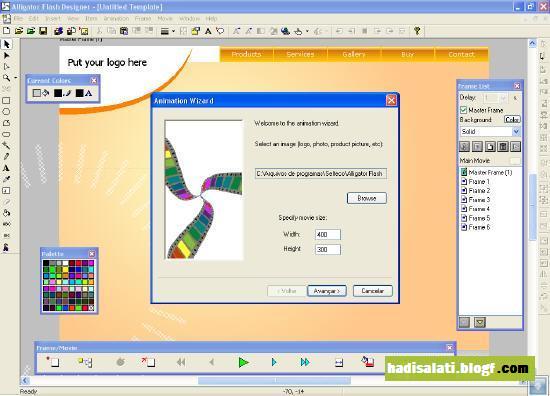
Alligator Flash Designer is the World's easiest visual tool for
creating Flash animations, websites and other Flash-based projects.
With its incomparable ease of use, powerful set of tools and
competitive pricing, it's a perfect choice for both amateur and
professional users.
Features:
Create Flash websites, presentations, slide shows, menus, banners, buttons and online applications
Import photos, screenshots, Flash cliparts, animated GIFs and video files
Add shapes, lines, curves, text, 3d effects and gradients
Insert links to other pages, create buttons and clickable hotspots
Play background music, voice-overs and click sounds
Apply animation effects (like zoom, flip, rotate, slide-in, fade) to each object
Export Adobe Flash files (SWF) and add them to your website
Use ActionScript 2.0 to handle your own events
Download: (Size: 2,84 MB)
+ نوشته شده در Tue 12 Aug 2008 ساعت 13:30 توسط هادی سلاطی
|
Portable Step by step Note teacher 2.7 Size 2.9 MB
Learning how to read musical notes and sheet music can be easy and fun through our software...
Step-By-Step Note Teacher makes it easy to learn, practice and enhance the abilities of reading musical notes and sheet music.
Our easy to use learning tool utilizes unique algorithms for learning
through repetition, motivation, gradual difficulty, and variable
corrections.This provides you with a stable, efficient, as well as
rewarding learning experience.
Step-By-Step Note Teacher can be configured for different learning
levels: from two notes (easiest) to a full 6 octave note range in both
clefs. This method enables the user to learn in a way that is right for
their beginning level of knowledge. There is also a note counting tool
that teaches the basics of musical values and counting.
Wrong answers can be optionally corrected, and can be configured for any combination of picture and/or voice correction.
Motivational methods for kids include a "cheering up" mode, and symbolic cartoon prizes at the end of a well scored test.
Every exercise is logged in a separate text file, for ease of tracking the progression of the user's reading ability.
Changes in version 2.7:
Added help,online help,tutorial,forum,online support Download: (Size: 2,9 MB)
+ نوشته شده در Tue 12 Aug 2008 ساعت 13:28 توسط هادی سلاطی
|
Blumentals Easy Button and Menu Maker Pro v1.3→ Graphics & Design
With Easy Button & Menu Maker you can easily create sophisticated
buttons and professional dynamic menus for your website while investing
just a few minutes of your time. More than 100 elegant design templates
are included, reflecting various design styles such as so called Glass
and Vista style.
Unlike most other menu tools, Easy Button & Menu Maker provides
direct WYSIWYG visual menu editor, so it is much easier and pleasant to
work with. Menus created with Easy Button & Menu Maker are quick,
compact and compatible with all modern web browsers.
Key Features
Easily create cool web buttons
Easily create dynamic multi-level website menus
Direct visual WYSIWYG menu editor
Use fonts of your choice
Add icons to the buttons and menus
Easily insert created buttons and menus in your website
All Web browsers and systems are supported
The generated code is valid and standards compliant
GIF, PNG and JPEG image formats are supported Download:( 5,16 MB )
+ نوشته شده در Tue 12 Aug 2008 ساعت 13:25 توسط هادی سلاطی
|
Format Factory is a multifunctional media converter.
Provides functions below:
All to MP4/3GP/MPG/AVI/WMV/FLV/SWF.
All to MP3//WMA/MMF/AMR/OGG/M4A/WAV.
All to JPG/BMP/PNG/TIF/ICO/....
Rip DVD to video file.
MP4 files support iPod/iPhone/PSP format.
Source files support RMVB.
FormatFactory's Feature:
1. Support converting all popular video,audio,picture formats to others.
2. Repair damaged video and audio file.
3. Reducing Multimedia file size.
4. Support iphone,ipod multimedia file formats.
5. Picture converting supports Zoom,Rotate/Flip,tags.
6. DVD Ripper.
7. Convert iPhone/iPod .ithmb picture file to .jpg,.bmp,.png,.tif .
+ نوشته شده در Tue 12 Aug 2008 ساعت 13:21 توسط هادی سلاطی
|
Ornatrix is a hair solution plugin for 3d Studio Max. Starting from
scratch it allows you to create, model, animate, and render any type of
hair, fur and almost any other fiber-based object you can think of.
By having a collection of innovative tools at your disposal you can
quickly and intuitively set up great looking hair much like a real hair
stylist does - style it to your needs. Because Ornatrix is so closely
incorporated into 3d Studio Max interface, its skills will come
naturally to 3dsmaxusers. Provided help and tutorials will get those
new to the field up and running in no time Links :
RapidShare:
+ نوشته شده در Mon 11 Aug 2008 ساعت 1:30 توسط هادی سلاطی
|
Use FreeHand MX for creative design,
storyboarding, document production, and editing with an unparalleled
set of creative design tools. Easily repurpose your designs for print,
the Internet, or Adobe Flash.
Adobe and the Future of FreeHandNo updates to FreeHand have been made
for over four years, and Adobe has no plans to initiate development to
add new features or to upport Intel-based Macs and Windows Vista.
To support customer workflows, we will continue to sell FreeHand and
offer technical and customer support in accordance with our policies.
While we recognize FreeHand has a loyal customer base, we encourage
users to migrate to the new Adobe Illustrator CS3 which supports both
PowerPC and Intel-based Macs and Microsoft Windows XP and Windows Vista. Features :
Illustrator CS3 offers powerful new features, including functionality
designed to appeal to FreeHand users such as tight integration with
Adobe Flash CS3 Professional, sophisticated color controls, an
intuitive Eraser tool, easier Path editing, and more responsive
performance.
FreeHand customers can switch to Illustrator CS3 for US$199 (volume
licensing also available), and access complimentary resources to ease
the transition. For additional information, please visit
FreeHand MX Top FeaturesMultiple Attributes
Apply unlimited stroke, fill, and effect attributes to a single vector or text object.
Action Tool
Drag and drop complex Macromedia Flash actions between objects, symbols, and pages.
Connector Lines Tool
Quickly map information architecture, data flows, and site maps.
Key features
Check out the top features in FreeHand MX.
You can either walk through the features page by page or jump to any of the features listed below. Start ›
Workflow
Graphic symbols
Docking panels
Anti-alias view
Designed for Windows XP
Built for Mac OS X
Multipage design and production
Master pages
Multipage environment
Connector Lines tool
Connector Line styles
Intuitive design tools
Extrude tool
Eraser tool
Blend tool
Pen tool
Freeform tool
Symbol-based brush and spray strokes
Design power
Multiple attributes
Live effects
Live-edit graphic primitives
Image alpha-channel support
Vector transparency
Perspective grid
Interactive transforms
Productivity
Object panel
Output area
Object for symbol swapping
Animation
Release to Layers command
Animation effects
Effects
Enhanced gradient fills
Gradient fill handles
Brush enhancements
Calligraphic stroke
Adobe Flash integration
Action tool
SWF import/re-export
Launch-and-edit workflow with Flash
FreeHand MX importer for Flash
Navigation panel
Print layouts for Flash
Adobe Fireworks integration
FreeHand MX importer for Fireworks
Fireworks PNG importer
Launch-and-edit workflow with Fireworks
Multiple Attributes
FreeHand MX in ActionSee FreeHand MX in Action
Do even more with your designs with new FreeHand MX multipublishing features.
+ نوشته شده در Thu 17 Jul 2008 ساعت 2:41 توسط هادی سلاطی
|
Get everything in Adobe® Photoshop® CS4 software and more with Photoshop CS4 Extended, which enables you to edit 3D and motion-based content and perform image analysis.
Reasons to upgrade >>Smart Filters >>Quick Selection and Refine Edge tools >>Advanced compositing >>3D compositing and texture editing* >>Movie Paint* >>2D and 3D measurement tools* >>Streamlined interface >>Better raw-image processing >>Enhanced Vanishing Point with 3D support* >>Enhanced 32-bit HDR support* Download:
(Size: 490MB)
+ نوشته شده در Fri 4 Jul 2008 ساعت 1:11 توسط هادی سلاطی
|
Virtual Plastic Surgery Software v1.0.0.1484 → Graphics & Design
Plastic surgery simulator software that will let you modify face and body to simulate aesthetic surgery.
WHAT IS THE VIRTUAL PLASTIC SURGERY SOFTWARE ( VPSS ) ?
The VPSS is a simple to use, yet powerful photo warping software that will let you modify photos to simulate virtual plastic surgery results on anyone's face and body. As a specific purpose software, we developed a custom and convenient interface more suited for virtual plastic surgery simulation than anything you will find on general purpose, thousand dollars traditional software suits.
Our software is popular among plastic surgeons who want to discuss surgery outcome with their patients, plastic surgery candidates who want to "preview" the potential results of an aesthetic surgery , social network participants who want to improve their appearance, and people who want to have fun warping photos of faces, bodies, celebrities and pets in a caricaturist fashion.
WHAT CAN OUR SOFTWARE DO ?
With its photo warping tools, you can use our software to perform virtual plastic surgery simulations on your favorite photos. The photos on the right column are some examples of these virtual surgeries. You can for example simulate:
* Virtual rhinoplasty ( nose job ) * Virtual chin reduction / augmentation * Virtual face contouring * Virtual tummy tuck * Virtual lips augmentation / reduction * Virtual breast augmentation / reduction * Any kind of virtual liposuction on face and body * Virtual buttock augmentation / reduction * Virtual Ethnic plastic surgery * Virtual muscle augmentation / reduction * .... many more virtual transformations...
Quote:
DWNLAD (Size: 2,20 MB)
+ نوشته شده در Mon 30 Jun 2008 ساعت 1:29 توسط هادی سلاطی
|
npaint reconstructs the selected image area from the pixel near the area boundary. Inpaint may be used to remove undesirable objects from still images.
Delete any unwanted object from your photo, such as extra power-line, people, text... The program will automatically inpaint the selected area to erase it.
Features:
*If some unexpected object spoils an otherwise good photograph, Inpaint may be used to remove it. Simply select the object. No need for fiddly messing about with the clone tool!
*It is alarmingly simple to use. Draw a selection around the object you wish to remove from the picture, and run smart remove selection. Inpaint will fill the selection area with intelligently generated texture drawn from the surrounding image data.
really magic function you should try it!
In some cases you need to correct area boundary which used in inpainting (rectangular area around selection, with resize handles), you need to exlude from this area part which you think is don't take part in image restoration. To do this hold down the SHIFT key and using the mouse try to resize or move it. Look to the following illustrations:
Minimal System Requirements
* Microsoft Windows XP or higher * 2000 MHz processor * 256 MB RAM * No hardware acceleration is required
Download:
(Size: 1 MB)
+ نوشته شده در Fri 27 Jun 2008 ساعت 16:9 توسط هادی سلاطی
|
fryrender is the unbiased spectral renderer developed by Feversoft.
All the elements involved in the render (materials, lights, cameras, ...) are based on physically accurate models up to the point that when you hit render a simulation of the real behavior of light happens inside.
Moreover, fryrender is the first engine of its kind capable of transforming scenes into a format that can be navigated in real-time with the aid of our Virtual Reality technology Random Control 4.
Why choose fryrender ?
Besides its quality, stability, and speed, our engine comes packed with an outstanding list of useful features that really make the difference.
Moreover, fryrender's development moves really fast and we can assure you that the current status of the product is just the beginning.
And last, but certainly not least, we put great care into listening to our customers. You can be sure that fryrender has been developed with you in mind.
Features :
General interface
In fryrender All the properties for physical materials, cameras, environment, ... are available to your host modelling app of choice via our plugins.
All the controls in the UI are shared by the standalone renderer and all the plugins. This way, you are not forced to learn a new application in order to use our technology.
fryrender standalone (fryrender.exe) is our core rendering application.
It's invoked by the plugins when a new render is started, so you can think of it as a render manager. Because of its minimal user interface, it is a very lightweight and convenient application, both to control the render task while the engine is computing, and to add final touch-ups to your scene.
Environment
The ENV tab in the standalone app will let you choose between the two main types of environmental illumination in fryrender: Physical Sky and Environment Mapping.
The Physical Sky system has its own Atmosphere Editor, where you can set features such as the geo-location, the time and date, and the North orientation.
The Environment Mapping panels will let you select a constant color or a map, for each of the three available channels (illumination, background and reflections).
Material editor
The Material editor is one of the most carefully designed areas in the fryrender UI. This editor is accessible from the plugins, and the standalone app. A lightweight standalone material editor (fryeditor.exe) is also included.
On the left of the Material editor window, you will find a convenient library browser that will let you pick already existing materials.
On the middle, there is a quick preview area that will also let you render a bigger popup version of the material, ready for our materials repository.
The right side of the editor contains the layer properties.
Those properties are conveniently classified for better clarity, and are accessible from the icons in the Layers Tree at the bottom of the dialog.
Drag and Dropis fully supported along the application, for both color buckets and maps. A Media Pool clipboard is also provided at the bottom-right corner of the editor to help you share maps and colors among your materials/layers.
Map editor
An ever-growing list of maps is supported in fryrender. Besides bitmaps (in .JPEG, .TGA, .BMP, .PNG, .TIFF and .HDR formats) some other fundamental procedurals have been built-in, such as checker/grid, noise, gradient, ...Other more complex geometry-based maps such as dirt (for AO-driven layer weighting) or colorgen (to randomize colors in instancing) are also supported.
Besides, the map editor contains a very convenient set of common UV-mapping and RGB operators to modify the maps quickly and in-place. These operators include UV flips, offsets, tilings and rotations, and RGB invert, gamma, levels, saturation, brightness, contrast, and more.
Layer Blending
In fryrender you can designate each light source to be attached to a certain layer.
Then (even while the render is still computing) you can modulate the power of each layer dynamically, chaning its power, RGB tone, or color temperature. This way, you can test and output many different light setups with just one render.
Out standalone app provides you with a Layer-Blending mixer. There you will find individual controls (toggle on-off, power, color, temperature) for each layer, and also a timeline in case you want to produce a Layer-Blending animation. layer blending
Aeronoise
A very interesting and unique feature in fryrender is Aeronoise. While the engine is computing, you can airbrush or marquee regions of your render where you would like the CPU to focus on. By doing this, fryrender will deviate all of its energy to the selected region so it clears faster.
Aeronoise comes in really handy to cut down render times, since it will let you get rid of the residual noise in conflictive areas once the rest of the render is already clean. But more than that, it is also a very useful tool when it comes to quickly previewing certain areas in the render during the setup phase, before a final shot is rendered.
and more.....
(Size: 25.3 MB)
+ نوشته شده در Fri 27 Jun 2008 ساعت 16:7 توسط هادی سلاطی
|
Adobe® FrameMaker® 8 software is a powerful authoring and publishing tool for technical communicators.
Work in a WYSIWYG, template-based authoring environment, handle structured content in XML and SGML using DITA or DocBook, single-source variations of the same document through advanced conditional output, and leverage new support for Unicode, 3D, and rich content to create engaging documentation in multiple languages and formats.
Quote:
+ نوشته شده در Wed 25 Jun 2008 ساعت 13:30 توسط هادی سلاطی
|
Adobe Photoshop CS3 Extended (tested on XP) - 464 MB
Ideal for film, video, and multimedia professionals and graphic and web designers using 3D and motion, as well as professionals in engineering and science, Adobe Photoshop CS3 Extended software delivers everything in Photoshop CS3 and more. Render and incorporate 3D images into your 2D composites. Stop time with easy editing of motion graphics on video layers. And probe your images with measurement, analysis, and visualization tools.
FEATURES:
Nondestructive editing Edit nondestructively with new Smart Filters, which let you visualize different image effects, and Smart Objects, which let you scale, rotate, and warp raster and vector graphics - all without altering the original pixel data.
Rich painting and drawing toolset Create or modify images with a wide assortment of professional, fully customizable paint settings, artistic brushes, and drawing tools.
Advanced compositing Create more accurate composites by automatically aligning multiple Adobe Photoshop layers or images based on similar content. The Auto-align Layers command quickly analyzes details and moves, rotates, or warps layers to align them perfectly, and the Auto-blend Layers command blends the color and shading to create a smooth, editable result.
3D compositing and texture editing Easily render and incorporate rich 3D content into your 2D composites - even edit existing textures on 3D models directly within Photoshop Extended and immediately see the results. Photoshop Extended supports common 3D interchange formats, including 3DS, OBJ, U3D, KMZ, and COLLADA, so you can import, view, and interact with most 3D models.
Movie Paint Enhance video directly within Photoshop Extended. Now you can paint, add text, and clone over multiple frames of an imported video sequence.
2D and 3D measurement tools Extract quantitative information from images with new measurement tools. Easily calibrate or set the scale of an image, and then use any of the Photoshop Extended selection tools to define and calculate distance, perimeter, area, and other measurements. Record data points in a measurement log and export data, including histogram data, to a spreadsheet for further analysis.
Faster, more flexible asset management with Adobe Bridge CS3 Organize and manage images more efficiently with next-generation Adobe Bridge CS3 software, which now delivers improved performance, a Filter panel for easier searching, the ability to group multiple images under a single thumbnail, the Loupe tool, offline image browsing, and more.
Better raw-image processing Process raw images with increased speed and superior conversion quality using the Photoshop Camera Raw plug-in, which now adds support for JPEG and TIFF formats; new tools including Fill Light and Dust Busting; compatibility with Adobe Photoshop Lightroom software; and support for over 150 camera models.
Enhanced Vanishing Point with 3D support Edit in perspective on multiple surfaces - even those connected at angles other than 90 degrees - with the enhanced Vanishing Point, which also lets you measure in perspective; wrap graphics, images, and text around multiple planes; and output 2D planes as 3D models.
Wide range of supported formats Import and export an even greater range of file formats, including PSD, BMP, DICOM, Cineon, JPEG, JPEG2000, OpenEXR, PNG, Targa, and TIFF.
System requirements Note: Adobe Photoshop CS3 and Photoshop CS3 Extended have the same system requirements.
Windows Intel Pentium 4, Intel Centrino, Intel Xeon, or Intel Core Duo (or compatible) processor Microsoft Windows XP with Service Pack 2 or Windows Vista Home Premium, Business, Ultimate, or Enterprise (certified for 32-bit editions) 512MB of RAM 64MB of video RAM 1GB of available hard-disk space (additional free space required during installation) 1,024x768 monitor resolution with 16-bit video card DVD-ROM drive QuickTime 7 software required for multimedia features Internet or phone connection required for product activation Broadband Internet connection required for Adobe Stock Photos and other services
Macintosh PowerPC G4 or G5 or multicore Intel processor Mac OS X v10.4.8-10.5 (Leopard) 512MB of RAM 64MB of video RAM 2GB of available hard-disk space (additional free space required during installation) 1,024x768 monitor resolution with 16-bit video card DVD-ROM drive QuickTime 7 software required for multimedia features Internet or phone connection required for product activation Broadband Internet connection required for Adobe Stock Photos and other services
Downloads:
=========== RAPIDSHARE: ===========
Part 1: Part 2: Part 3: Part 4: Part 5:
============ EASYSHARE: ============
Part 1: Part 2: Part 3: Part 4: Part 5:
+ نوشته شده در Wed 25 Jun 2008 ساعت 13:29 توسط هادی سلاطی
|
Accelerate web design and development with Adobe Fireworks CS3 software, the ideal tool for creating and optimizing images for the web and rapidly prototyping websites and web applications.
Fireworks CS3 offers the flexibility to edit both vector and bitmap images, a common library of prebuilt assets, and timesaving integration with Adobe Photoshop CS3, Adobe Illustrator CS3, Adobe Dreamweaver CS3, and Adobe Flash
Rapidly Prototype and Design for the Web
New Adobe Fireworks CS3 dramatically accelerates web prototyping and web image design. Enjoy timesaving enhancements, new prototyping tools, and impressive integration with Adobe Photoshop CS3, Adobe Illustrator CS3, Adobe Dreamweaver CS3, Adobe Flash CS3 Professional, and Adobe Flex software.
Design and develop on the platform of your choice. Adobe Fireworks CS3 is available for PowerPC and Intel based Macintosh computers as well as Windows XP and Windows Vista systems.
Efficient Adobe Photoshop and Adobe Illustrator integration
Import Photoshop (PSD) files while retaining hierarchical layers, layer effects, and blend modes. Save Fireworks (PNG) files back into Photoshop (PSD) format. Import Illustrator (AI) files while retaining graphic integrity, including layer, group, and color information.
Hierarchical layer organization
Organize and manage your prototypes with a new hierarchical layer structure, which is similar to the one in Adobe Photoshop, that enables you to easily organize web layers and pages.
Intelligent scaling
Intelligently scale buttons and graphic symbols (in vector or bitmap) with 9-slice scaling. Combine 9-slice scaling with the new Auto Shape library to accelerate website and application prototyping.
Multipage support
Use the new Pages panel to create multiple pages in a single document (PNG file), and share layers across multiple pages. Each page can contain its own slices, layers, frames, animations, and canvas settings, making it easy to simulate website flow in a prototype.
RIA layout prototyping
Prototype layouts for rich Internet applications in Fireworks, and then export them directly to Adobe Flex while retaining absolute positioning and styling.
Customizable assets
Jump-start your prototyping with a common library of frequently used graphic symbols, text symbols, and animations. Use the new Symbol Properties panel to customize symbol attributes.
Adobe Photoshop blend modes
Customize the appearance of your images with seven popular blend modes from Adobe Photoshop: dissolve, linear burn, linear dodge, vivid light, linear light, pin light, and hard mix.
Adobe Bridge integration
Enjoy a more efficient workflow with Adobe Bridge, which offers central access to project files and batch processing that can include multiple Adobe applications.
Streamlined Adobe Dreamweaver and Adobe Flash integration
Copy any object in Fireworks CS3 and paste it directly into Dreamweaver CS3. Create pop-up menus that can be saved as CSS and HTML. Export Fireworks (PNG) files directly to Flash CS3 while maintaining vectors, bitmaps, animations, and multistates, and then edit in Flash CS3.
Create and edit vector and bitmap images, and import and edit native Adobe Photoshop and Adobe Illustrator files.
2. Image optimization
Optimize graphics for virtually any delivery scenario with preview, cross-platform gamma preview, selective JPEG compression, and a wide range of export controls.
3. Filter effects
Apply lighting effects, shadow effects, styles, and blend modes, including seven new blend modes from Photoshop, to add depth and character to text and symbols.
4. Common library
Jump-start your prototyping with a common library of graphic symbols, text symbols, and animations frequently used in web applications, forms, interfaces, and websites.
5. Product Description
Adobe Fireworks CS3 accelerates Web design and development. Its the ideal tool for creating and optimizing images & rapidly prototyping websites and Web applications. Fireworks CS3 offers the flexibility to edit both vector and bitmap images, a common library of prebuilt assets, and timesaving integration with Adobe tools. Rapid prototyping for interactive layouts and rich Internet applications New Pages panel contains slices, layers, frames, animations, and canvas settings - offering multipage support Organize and manage your prototypes with a new hierarchical layer structure Apply lighting effects, shadow effects, styles, blend modes - add depth and character to text and symbols Work with a common library of graphic symbols, text symbols, and animations for frequent use in Web applications, forms, interfaces and sites Intelligent scaling - 9-slice scaling for buttons & graphic symbols; combine with the new Auto Shape library to accelerate website and application prototyping Streamlined Adobe Dreamweaver, Adobe Bridge and Adobe Flash integration.
Neat Image Pro Plus v5.9 Plug-In for Photoshop & standalone Retail → Graphics & Design
Neat Image is a filter designed to reduce visible noise and grain in photographic images produced by digital cameras and scanners. Neat Image is indispensable in low-light (indoors, night, astro) and high-speed (sport, action) photography. It is a tool for both professional photographers and digital image processing enthusiasts. Neat Image highlights:
* Neat Image is a noise reduction plug-in (plugin for Photoshop) and standalone application
* Neat Image provides the most accurate noise reduction currently available
+Neat Image efficiently reduces noise of the following types:
* high ISO noise produced by image sensors of digital cameras
* film grain visible in scanned images
* JPEG artifacts and more...
+Neat Image uses noise profiles; a large library of camera and scanner profiles is available
+Neat Image for Windows is available in several editions: from free Demo to $74.90 Pro+ edition
Version 5.9 of Neat Image /Win This update of Neat Image /Win adds support for new image editors and fixes several problems reported by users:
* Added support for CorelDRAW Graphics Suite X4 / Corel PHOTO-PAINT X4 * Added support for Corel Paint Shop Pro Photo X2 ( list of currently supported image editors )
* Improved compatibility with several new Samsung digital cameras
* Several other corrections and bug fixes ...etc... Download:
(Size: 2,05 MB)
+ نوشته شده در Fri 13 Jun 2008 ساعت 22:37 توسط هادی سلاطی
|
PhotoStudio v2 is truly complete imaging tool that contains everything needed to take professional studio quality images. It encapsulates wide range of features that helps you to explore an artist inside you to create, edit and modify images and give a boost to your imaging aptitude.
PhotoStudio v2 has basic parameters for an amateur user to create a new image as well as advanced tools, filters and special effects for the experienced one to engage in recreation with and show their professionalism.
Features:
Ribbon Style User Interface
Systweak Inc., is first to come up with the latest ribbon style interface in its imaging utility PhotoStudio v2. The new look gives better accessibility to all the options of menus, toolbars, task pane, maximizing the available workspace and easy to find available options. Keeping away the traditional look – keeps you off the boring interface; and puts-in added zeal for designing, in you. Also, we are the pioneer to launch a designing interface in an imaging product.
Ribbon Style User Interface Add effects for a professional touch Capture image from any device A touch of Perfection Group images to your requirements Re-design an image Share your memories Treasure your photos for a longer period of time
Take screenshots of running applications
Enjoy image viewing Smartly search for an image
Download:
(Size: 18.2 MB)
+ نوشته شده در Fri 13 Jun 2008 ساعت 22:31 توسط هادی سلاطی
|
Cover Commander creates professional, custom-designed three-dimensional virtual boxes for your software, e-books, DVDs, manuals, CD-ROMs, and even screenshots. A simple picture, Cover Commander Wizard, and a few mouse clicks are all that's necessary to get the job done. The programs extensive light, shadow, and reflection controls allow you to render a box or a cover of just about any complexity and see the final product as it is being made in the real-time preview window. The intelligent project creation wizard does the complex work for you, thus you can concentrate on the creative part of your project.
Features :
Perfect 3D Covers for Any Web Site
Quite often a box shot that you have ordered from a professional designer does not look good on your Web site after you re-design your site later. À soft shadow on white background looks differently from a shadow on dark-green background. Cover Commander takes this issue into account, producing just the perfect virtual cover that will blend into your Web site. If you decide to change your sites background later, you wont need to contact that books cover designer again; you simply open your Cover Commander project and change background color with a couple of mouse clicks. No matter how complex your Web site design is Cover Commander will create a box shot that looks just right in your layout. Extensive background color and transparency, gradient, shadow and reflection controls will create you the box or cover you want. Refer to Virtual Cover Gallery for samples.
Speaking Their Language
Cover Commander user interface is available in multiple languages, so no matter where you live and what language you speak you can still create high-quality covers that would sell your product and help you become the number one in your market.
Reasons To Go With Cover Commander
Get your cover designed in just a few mouse clicks. Let the built-in wizards do the dirty work for you and focus on the artistic details of the cover. Save the result image with transparent background and use the picture for the complex web or print designs. Save the light, shadow, and reflection settings under a unique name and use those settings in other projects. Set the result image size and margins in pixels. Cover Commander does not require 3D accelerator to render 3D objects. Don't pay more than what it actually costs to create a great cover. Create additional covers at no cost at all! (Size: 5.5 MB)
+ نوشته شده در Fri 13 Jun 2008 ساعت 22:18 توسط هادی سلاطی
|
RGBmachine is a fast and easy photo editor based on seminal new photo editing technology.
It allows the user to rotate, resize, crop, correct color and remove red-eye problems in the fastest possible way. RGBmachine is focused on performing the most frequent and common actions. Due to this emphasis on simplicity, it is naturally faster and easier than any other complex and expensive photo-editing software such as Adobe Photoshop. This means that RGBmachine is the best solution for the users who have a mountain of photos to process.
Unfortunately, qualitative image processing can take up a lot of time.
It is often the case that comprehensive image processing leads to a significant amount of work. A number of methods have been devised in an attempt to save time, such as automatic correction or applying individual correction to a series of photos. Image processing without technical knowledge is certain to result in wasted hours and long sleepless nights behind a computer. All of these methods (especially the latter) have obvious drawbacks.
It is a sorry situation that only a small percentage of photos/images have passed through any recognized photo editing at all. And even when editing does take place, many brands of seemingly well-equipped editing software have been poorly designed for the majority of digital photos.
RGBmachine has been developed to address this arduous task of applying frequent actions using the fastest possible method available. Although the architecture of RGBmachine has been geared to high speed processing, a central capability of the software is also best image quality.
Five advantages of RGBmachine:
1. It uses a folder-to-folder batch framework. RGBmachine orders all photos from the input folder as a chain, avoiding the laborious task of editing photos one-by-one. This obviously helps to save time (see next item).
2. Instead of the usual two-step dialogs of file-open and file-save, RGBmachine features only one Save/Next button. The software automatically saves the current image and passes onto the next one. The next image then instantly appears from the cache.
3. The conventional method to rotate/crop an image involves moving the crop area over a static image. This widespread but outdated mode is easier for coding and stems back to times when CPUs were relatively weak. However, in RGBmachine the reverse is true as the image can be moved beneath the crop area. This approach is more natural and user-friendly, controlling both the vertical and horizontal axis.
4. Although "Curves" is one of the best color-editing tools, it is unfortunately not the easiest. To make things simpler, RGBmachine uses a unique color correction engine to reconstruct the most appropriate color curves. The user just gives a basic indication of how the color, brightness or contrast should be changed.
5. There is no need to control the file history in RGBmachine. Instead, all different actions are controlled independently, which means that anything can be changed or reset at any given moment.
(Size: 1.4 MB)
+ نوشته شده در Mon 9 Jun 2008 ساعت 21:59 توسط هادی سلاطی
|
Adobe® Illustrator® CS3 software allows you to create sophisticated artwork for virtually any medium. Industry-standard drawing tools, flexible color controls, and professional type controls help you capture your ideas and experiment freely, while timesaving features such as easier-to-access options let you work quickly and intuitively. Improved performance and tight integration with other Adobe applications also help you produce extraordinary graphics for print, web and interactive, and mobile and motion designs.
If you need to create night skies, space scenes, and galaxies often for your image compositions, then you’ll love to explore Diard Software’s Universe Image Creator product. Using Universe Image Creator (hereafter called Universe), you can whip up your own Milky Way in a few seconds!
There are nine effects like Stars, Textured Stars, Nebula, Vortex, Lens Flare, Galaxy, Distant Star, Interstellar Gas, and Planets choose any of these effects as required. For this tutorial, I'm selecting Galaxy.
All the effects generate realistic space images -- also, every effect opens a new dialog box containing:
Properties sliders for the effect selected to make changes, A preview area, A Reseed button which is used to recreates the plug-in effect using a new sequence of random numbers, An orientation control to change the placing of the effect, and Preset types that you can choose.
This effect generates a galaxy by rendering a 3D image behind the scenes. You can create a spiral, elliptical, or barred galaxy. Orientation and viewing distance controls to give the galaxy a true 3D appearance. Click OK when you are ready to apply the effect.
System Requirements: Windows 98, Me, 2000, XP, Vista